Search
Search
Search is a full-screen slide-in search overlay that provides suggestions, recent search history, popular keywords, product recommendations, and category navigation.
Visual Specifications
Section titled “Visual Specifications”| Property | Value |
|---|---|
| Overlay | Fixed, 100vw/100vh, White background |
| Animation | Slide from left, 300ms ease-in-out |
| Header Height | 64px, bottom border tselGrey40 |
| Search Form | 48px height, rounded-3xl, bg-tselGrey20 |
| Font (Form) | Poppins Light, 14px |
| Font (Titles) | Telkomsel Batik Bold, tracking-wide |
Content Sections
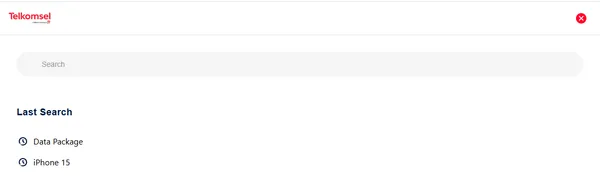
Section titled “Content Sections”Shows a reverse-chronological list of recent search queries.
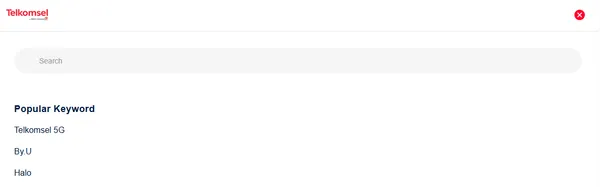
List of trending search keywords. Supports hover states with underline and red text color.
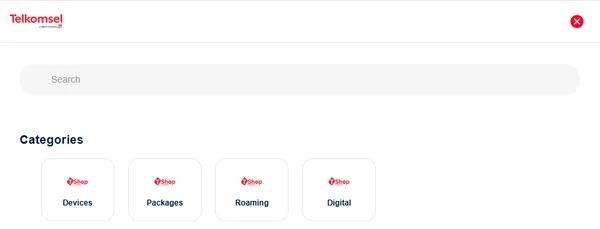
Grid/carousel view of categories with icons and labels.
Category Card Specifications
Section titled “Category Card Specifications”Cards are 86×96px with rounded-2xl (20px) corners, border tselGrey40, and centered content.
| Element | Specification |
|---|---|
| Icon Container | 32px (mobile) to 40px (desktop) |
| Label Font | Telkomsel Batik Bold, 12px |
| Hover State | translateY(-2px), subtle shadow (0 2px 8px) |
Behavior
Section titled “Behavior”| Interaction | Perilaku |
|---|---|
| Open | Slide-in from left (300ms) |
| Clear | Clear input with X button |
| Search | Filter suggestions on input change |
| Submit | Trigger cookies check/search |
| Hover (Popular) | Underline + text-tselRed |
Usage Guidance
Section titled “Usage Guidance”When to use
Section titled “When to use”- Site-wide search functionality
- Contextual product or category discovery
- Providing quick access to recent searches
Best practices
Section titled “Best practices”| ✅ Do | ❌ Don’t |
|---|---|
| Provide clear visual feedback | Omit clear/close actions |
| Use consistent iconography | Overload search results |
| Highlight search matches | Use cryptic labels |