Invoice
Invoice
Invoice displays transaction status with themed templates, custom content projection, and action buttons for payment confirmations.
Visual Specifications
Section titled “Visual Specifications”| Property | Value |
|---|---|
| Image Size | 124x124px |
| Padding | 24-32px |
| Border Radius | 8-16px |
| Label Size | 20-24px |
| Description Size | 14-16px |
Template Themes
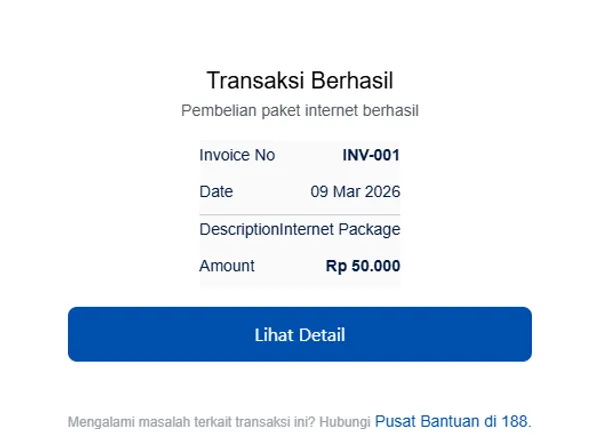
Section titled “Template Themes”Bordered card with separated content rows
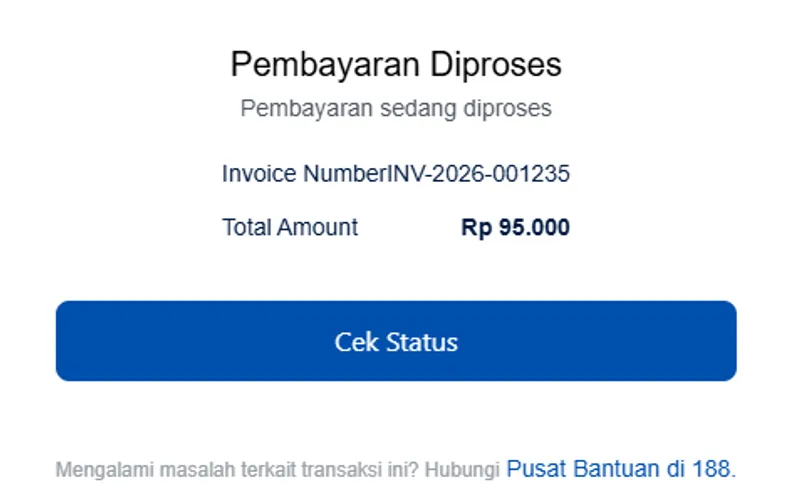
Compact layout with minimal spacing
Configuration Options
Section titled “Configuration Options”| Option | Type | Description |
|---|---|---|
content | InvoiceViewModel | Status and content data |
config | InvoiceConfig | Theme and styling options |
InvoiceViewModel
Section titled “InvoiceViewModel”| Property | Type | Description |
|---|---|---|
image | string | Status image URL |
title | string | Status label |
desc | string | Status description |
status | string | Status identifier |
content | any | Template data |
InvoiceConfig
Section titled “InvoiceConfig”| Property | Type | Description |
|---|---|---|
theme | `‘bordered’ | ‘compact’ | Template style | |
backgroundColor | string | Custom background |
Status Types
Section titled “Status Types”| Status | Use Case |
|---|---|
| Success | Payment completed |
| Pending | Payment processing |
| Failed | Payment rejected |
| Refunded | Money returned |
Content Projection
Section titled “Content Projection”| Slot | Description |
|---|---|
#action | Custom action buttons |
#customDOM | Custom content (compact mode) |
Usage Guidance
Section titled “Usage Guidance”When to use
Section titled “When to use”- Payment confirmation pages
- Transaction receipts
- Order completion screens
- Invoice download pages
Best practices
Section titled “Best practices”| ✅ Do | ❌ Don’t |
|---|---|
| Match status to visual | Confusing indicators |
| Provide download option | No record access |
| Include support link | No help option |
| Clear next steps | Unclear what to do |